Stay oriented
Read your heading at a glance with a compass that follows your view. Keep directions and degree markings where you want them.
 SCORCH LAUNCHER
BUILT FOR SCORCHPVP / EARLY ACCESS
Your HUD. Your fight.
Less setup. More time in the fight. Launch Minecraft with Scorch’s customizable HUD, keep your essentials in view, and make your next session your own.
Windows 64-bit · Minecraft Java account required
Launcher 0.2.0-alpha.24 · 127.9 MiB · Early access

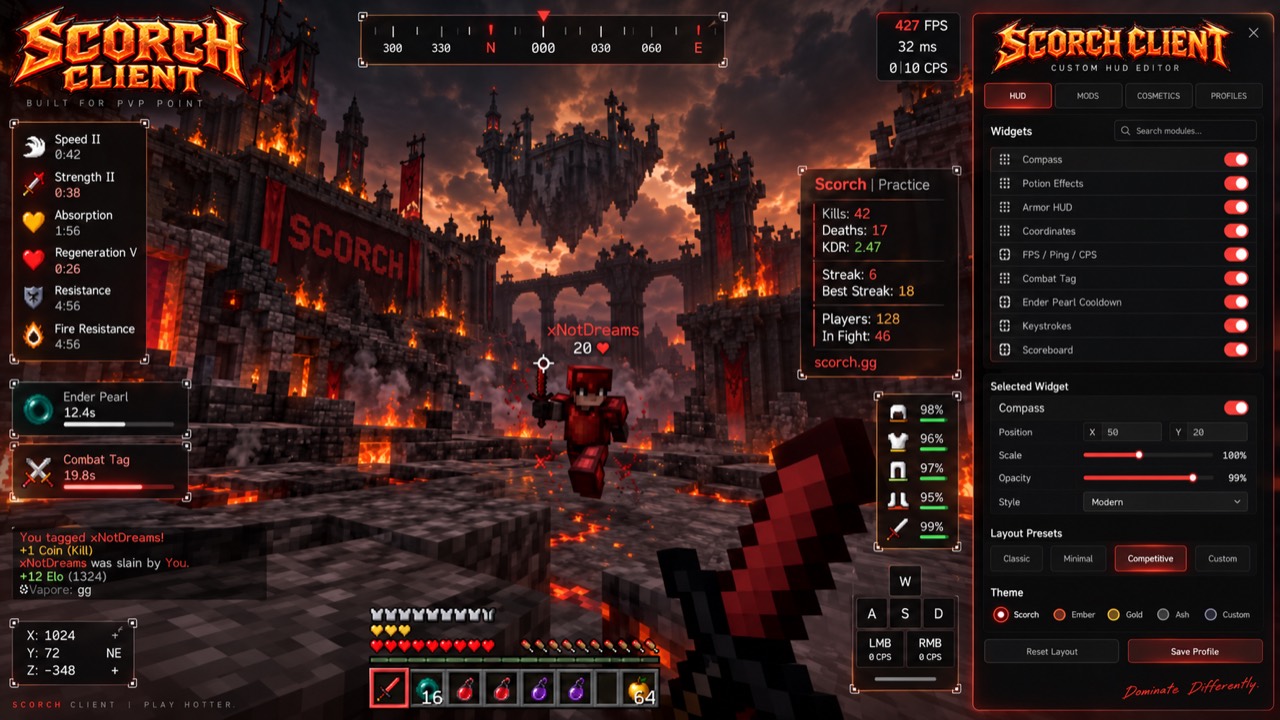
Customize your HUD and save your layouts. This release is still being tested.
BUILT AROUND YOUR PLAYSTYLE
Move it. Scale it. Make it yours.
Read your heading at a glance with a compass that follows your view. Keep directions and degree markings where you want them.
Keep armor durability, your held item and active potion effects in view without opening your inventory. Tiered items stand out: Simple gray, Unique green, Elite blue, Ultimate yellow, Legendary gold and Soul red.
Check FPS, ping, left and right CPS, coordinates, keystrokes and the server scoreboard in one layout you control.
Put useful information where your eyes naturally go. Move and resize widgets, adjust colors and opacity, and save named layouts for later.
The launcher prepares Java, Minecraft, Forge and Scorch’s HUD automatically. ScorchPvP artwork appears while loading, with the website landscape behind the main menu and settings screens. Required updates are handled through the launcher.
Your managed client adds scorchpvp.com to Multiplayer. Faithful 32x supplies a sharper vanilla look, with Faithful 64x included as another choice.
Choose flashing armor and expiring-buff alerts, with a quiet warning sound. Set the thresholds and buffs that matter to your fights.
Save base and raid locations with colored beacon beams and compass directions. Customize names, positions, colors and beam size. Keep your last death marker and switch on chunk borders for building. Your markers stay local to your player, server and dimension.
Toggle sprint, hold to zoom, lower the fire overlay and choose how many particles you see. All controls are adjustable and rebindable.
Combat restrictions, ability cooldowns and Envoy/KOTH panels receive their information from ScorchPvP. These panels await the server connection’s activation; missing information is shown as unavailable.
GET INTO THE GAME
The launcher prepares the right Java runtime, Minecraft version, Forge and Scorch HUD for you. Your Scorch setup has its own game folder.
Save the player guideDownload the Windows installer, open it, and follow the setup steps. Leave Run Scorch Launcher selected and choose Finish to open Scorch immediately.
Choose Sign in with Microsoft. Complete sign-in in the Microsoft page opened by the launcher, using the account that owns Minecraft Java Edition.
The launcher prepares and checks your game files, then opens Minecraft. Install any required launcher update first. Each launch verifies the current release; the initial game download can take a few minutes.
Open Multiplayer and choose the saved ScorchPvP server. Once in game, press Right Shift to open the editor. Choose your widgets and select Save Profile.
BEFORE YOU DROP IN
No. The Scorch Launcher manages its own required Java runtime, Forge and client files. Download the installer and use the launcher to play.
Faithful 32x is the starting look, with Faithful 64x also included. Diamond armor keeps its familiar blue color. Choose either pack or Default in Minecraft’s Options → Resource Packs menu. Existing custom pack selections are preserved, and switching back to Default stays saved.
Textures by Faithful Resource Pack contributors, included free under the Faithful License. Texture assets are unchanged; Scorch adds distribution credits. Faithful does not endorse ScorchPvP.
No. Scorch Client is optional. You can continue playing with a supported regular Minecraft client.
No. Sign-in happens on Microsoft's website. The launcher receives the account authorization it needs to start Minecraft. You can sign out in the launcher.
The alpha brings the charcoal-and-ember HUD style into Minecraft. Your world, equipment textures and lighting come from your game and resource packs. Combat and pearl timers, cosmetics, faction maps and cinematic scenery are not included.
Choose Update to Play when prompted. Scorch verifies the download, installs the update, and reopens automatically. If you are updating from an older launcher and see the setup wizard, leave Run Scorch Launcher selected and choose Finish. The launcher checks for required updates before Play. Install any launcher update to continue; connection or update-service failures must be resolved before playing.
Open Settings → Game folder in the launcher. Your layout lives in config/scorchclient/hud.json. To reset it, move that file and hud.json.bak to a backup folder while Minecraft is closed.
Yes. Experienced players can download the standalone HUD mod or the manual-install ZIP. This optional path requires Forge 1.8.9 build 2318 and Java 8. Follow the advanced section in the guide.
Microsoft sign-in has been reported working by the owner. Local automated checks cover the HUD, launcher and server bookmark; full player walkthrough and compatibility testing are ongoing. This is an early alpha. Visual polish, display configurations and combinations with other mods still need review. Read the release notes.
Compare your file's SHA-256 checksum with the published checksums. Scorch distributes its launcher and original HUD mod; game files and dependencies are fetched from their official sources when needed.
Scorch’s soundtrack: Red (No Vocals Alternative Mix) by Scott Buckley, used under CC BY 4.0. Menu and gameplay music follows your regular Minecraft Music volume setting.
MAKE EVERY PIXEL COUNT